1. Guide Overview
AgentVis lets Agents read and write files, run commands, call Skills, access the network, and perform browser or desktop automation under appropriate permissions. Sandbox Permission defines the boundary for these operations.
Think of Sandbox Permission as choosing how an Agent works:
- Work like a local assistant while retaining audits and dangerous-operation protection.
- Allow network access while routing network egress through AgentVis audit paths where possible.
- Run in a stricter isolated environment for untrusted scripts and high-risk tasks.
The sandbox makes high-risk Agent operations more explainable, auditable, and recoverable.
2. Where to Set Sandbox Permission
- Open an Agent.
- Open Agent Settings.
- Click Basic at the top.
- Find Sandbox Permission.
- Choose Local Audit, Controlled Network, or Offline Isolated.
- Click Save.
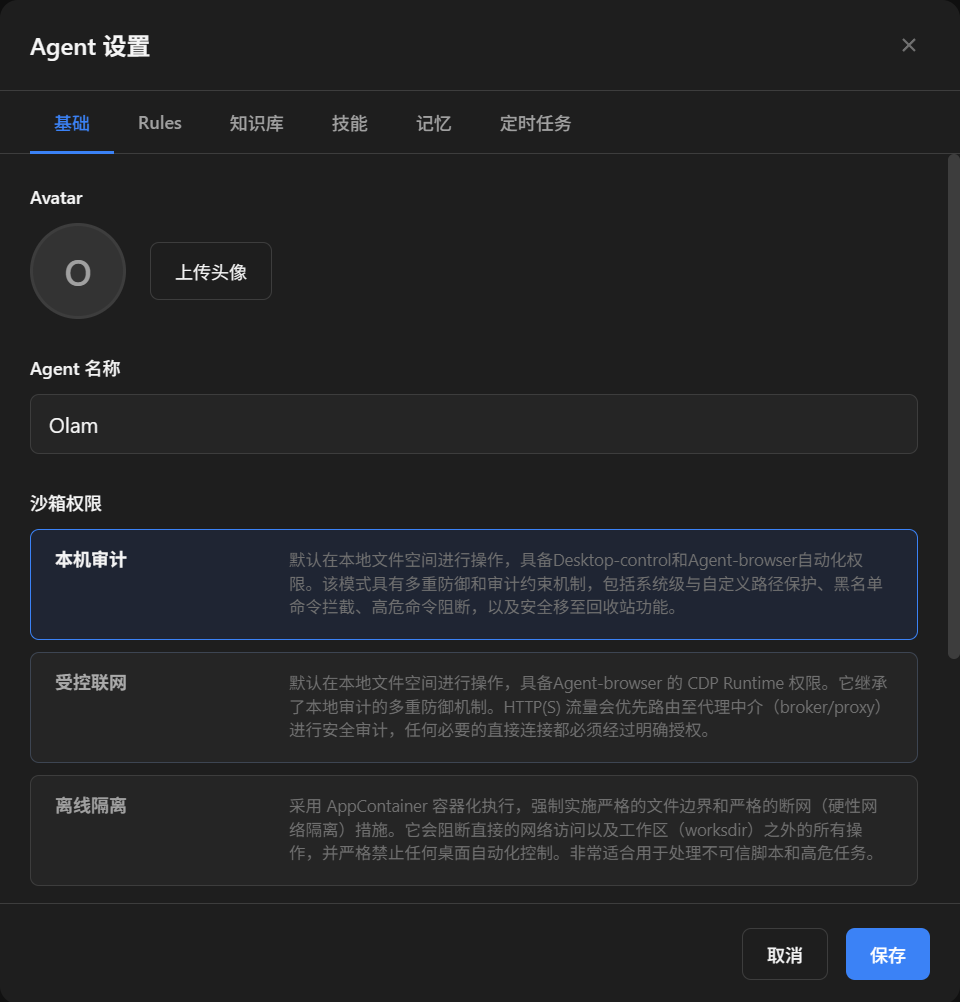 Basic" page showing the Agent name and three Sandbox Permission options." loading="lazy">
Sandbox Permission is configured per Agent. Different Agents can use different modes depending on your needs.
3. How to Choose Among the Three Sandbox Modes
| Mode | Best For | Boundary to Know |
|---|---|---|
| Local Audit | Everyday office tasks, local project development, and work that needs local files or desktop capabilities | Dangerous commands, protected paths, risky script scanning, soft deletion, and audits are enabled by default |
| Controlled Network | Tasks that need safer networking: webpages, GitHub, cloud APIs, email, and networked Skills | Focuses on network egress audit, not full VM isolation; normal tasks can still reuse local files and credential caches |
| Offline Isolated | Untrusted third-party Skills, high-risk scripts, or tasks limited to local workspace files | Network is banned, file boundaries are restricted, and desktop control, screenshots, hotkeys, and external GUI launch are blocked |
If unsure, choose like this:
- Default daily use: choose Local Audit.
- Daily use with safer network behavior: choose Controlled Network.
- If you do not trust the script or Skill source: choose Offline Isolated.
- When a task is blocked: check Security Audit first, then decide whether to adjust permissions.
4. Local Audit Mode
Local Audit is the default mode best suited for everyday work. Agents can operate like local assistants: work with files, access the network, run commands, use common development tools, and use desktop capabilities.
Best for:
- Everyday office tasks.
- Reading and writing code in local projects.
- Running tests, builds, and scripts.
- Opening browsers or performing desktop automation.
- Using existing local CLI tools, configuration, and caches.
It is not an unlimited mode. AgentVis still keeps multiple protections:
- Dangerous command checks and blocking.
- System protected paths and custom protected directory interception.
- Deletion operations go through Trash Bin soft deletion.
- Suspicious scripts are scanned before execution.
- Important execution events are written to audit logs.
If you trust the current Agent and task source, Local Audit usually gives the best experience.
5. Controlled Network Mode
Controlled Network is for tasks that need external network access while keeping network behavior auditable.
Best for:
- Everyday office tasks.
- Calling cloud APIs or third-party HTTP(S) services.
- Using Script Skills that need networking.
- Using AgentVis dedicated browser automation to visit webpages.
You should know:
- Controlled Network focuses on network egress, not isolating the entire local file system.
- HTTP(S) traffic preferentially goes through the AgentVis broker/proxy audit path.
- Script Skills can declare broker-only so scripts must send requests through the AgentVis broker.
- Non-HTTP(S) direct connections require clearer targets and authorization.
- Normal
exec/ Guide Skills do not claim that all direct connections are fully captured at the OS layer.
What Controlled Network Mainly Protects Against
Controlled Network is not simply "allow networking". It turns common high-risk network behaviors into blockable, confirmable, and auditable actions.
| Risk Scenario | How AgentVis Handles It |
|---|---|
| Bypassing proxy networking | Detects high-confidence proxy-bypass signals such as NO_PROXY=*, curl --noproxy, clearing proxy variables, direct proxy, and raw sockets, then blocks before execution. |
| Accessing localhost, private networks, or cloud metadata | broker/proxy rejects localhost, private, link-local, metadata, and similar targets, including private or metadata addresses encoded in hostnames. |
| Non-HTTP(S) direct connection | No broad allowance is granted. The protocol, host, port, and source must be clear enough before entering direct-audit authorization. |
| Uploading local files | Commands that clearly upload local files trigger one-time confirmation that only applies to this retry. |
| Sensitive exfiltration | High-confidence combinations such as reading .env or environment variables and placing them into a network body trigger confirmation. |
| Remote destructive actions | Deleting remote repositories, destroying cloud resources, dropping databases, or clearing remote storage triggers confirmation; cancel by default for real accounts and real resources. |
| Credential leakage | broker-managed credentials do not enter command lines, environment variables, logs, or observations, and are injected only over HTTPS to exact allowlisted hosts. |
| Hard-to-debug task failures | Security Audit records reason codes, target hosts, sources, and protection modes to help identify proxy bypass, risky targets, missing authorization, or runtime differences. |
Boundary note: Controlled Network is not a full VM, full-protocol transparent proxy, or generalized DLP. It focuses on containing network egress and high-confidence risky actions; the default mode is not described as full-protocol hard isolation.
If a task is blocked for proxy bypass, upload, sensitive exfiltration, or remote destruction, check Security Audit first instead of switching directly to a looser mode.
6. Offline Isolated Mode
Offline Isolated is the strictest common mode, suitable when you do not fully trust the task or Skill.
Best for:
- First run of an untrusted third-party Skill.
- Handling scripts from unknown sources.
- Only reading and writing current workspace files, with no network needed.
- Maximizing reduction of script access to the local environment.
Offline Isolated has these limitations:
- Network access is blocked.
- File access is limited to the workspace and app-managed directories.
- Desktop control, screenshots, hotkeys, and window activation are blocked.
- Launching external GUI / detached apps is blocked.
- Some Skills that depend on local Home, AppData, or CLI token caches may not work.
If the task truly needs network or desktop capabilities, Offline Isolated may not be appropriate.
7. How to Read the Security Audit Page
Open AgentVis, go to Settings, and click Security Audit on the left. The Security Audit page shows recent sandbox, broker/proxy, and network protection events.
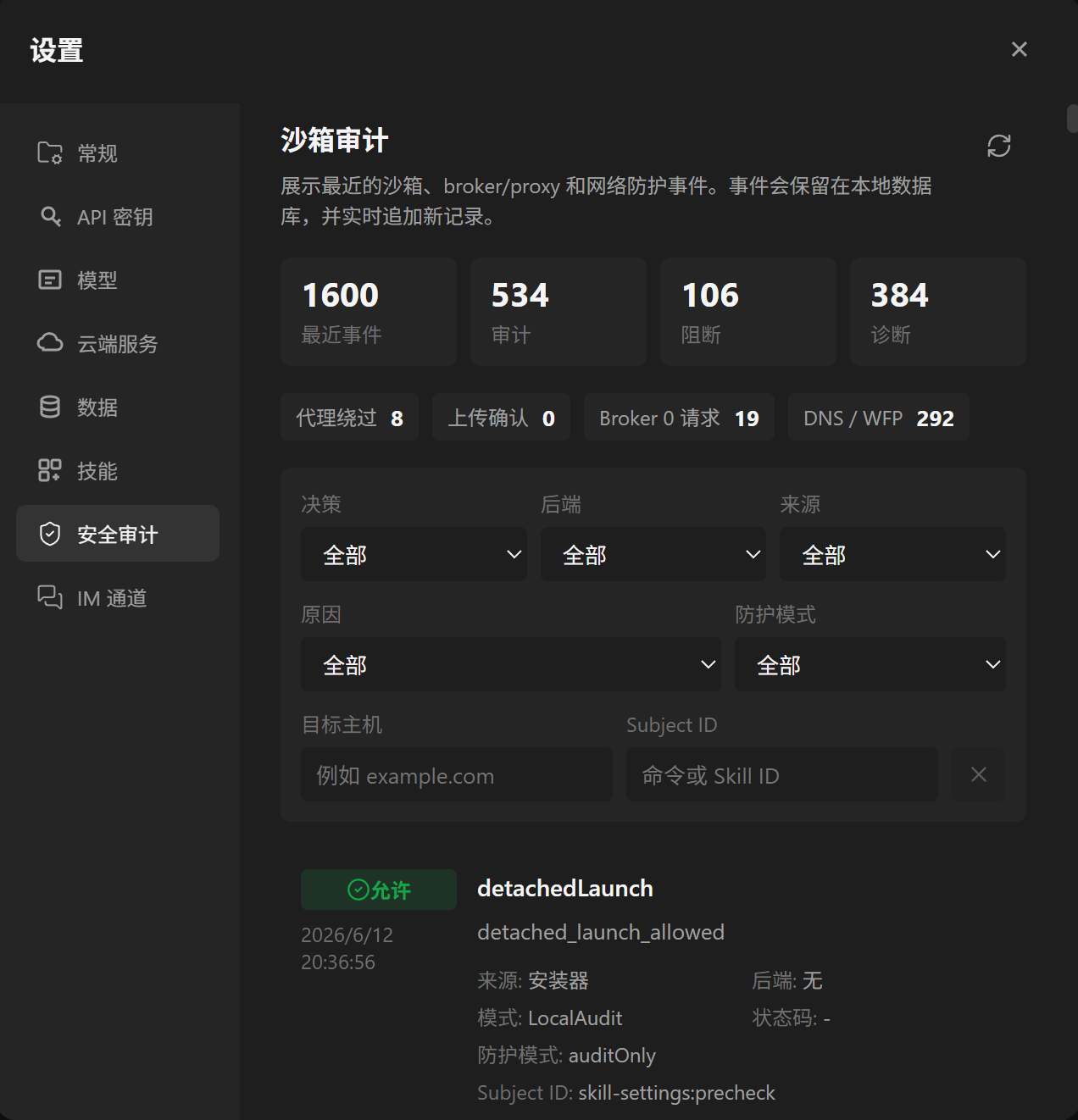 Security Audit" page showing stat cards, filters, and audit event list." loading="lazy">
7.1 Top Stats
- Recent events: total recent security-related events.
- Audit: events recorded but not necessarily blocked.
- Blocked: risky actions the system prevented.
- Diagnostic: supporting information about proxy, broker, network path, or runtime state.
Diagnostics do not always mean task failure. Some only indicate "no broker request was actually sent this time" or "a cache may have been hit".
7.2 Filters
You can filter by:
- Decision: all, audit, blocked, or diagnostic.
- Backend: sources such as Broker, Sandbox, or command validation.
- Source: whether the event came from a command, Skill, tool, or other execution path.
- Reason: search by specific reason code.
- Protection mode: filter by Local Audit, Controlled Network, or Offline Isolated.
- Target host: inspect network events for a domain or address.
- Subject ID: locate records by command or Skill ID.
7.3 How to Read One Event
For an audit event, usually check the labels, title, time, source, mode, reason, and target. If you only need to know why a task failed, start with blocked events. If you are checking whether network traffic used the proxy as expected, inspect diagnostic events.
8. Common Blocks and How to Handle Them
8.1 The Task Cannot Access the Network
- Check whether the current Agent uses Offline Isolated.
- Check whether a Script Skill declared network access disabled.
- Check whether proxy-bypass signals were blocked.
- Check whether the task accessed localhost, private networks, metadata, or other high-risk targets.
- Decide whether Controlled Network is needed.
8.2 Browser or Desktop Control Failed
- Check whether the current Agent uses Offline Isolated.
- Check whether the current Agent uses Controlled Network while the task needs general desktop control.
- Check whether the Skill declared desktop-control capability.
- If you only need to browse webpages, prefer AgentVis dedicated
agent-browserbrowser automation.
In general, arbitrary desktop control fits Local Audit better. Controlled Network only opens a narrow path for dedicated browser automation.
8.3 Third-Party Skill Cannot Access Files
- Check whether the current Agent uses Offline Isolated.
- Check whether the file is in the current workspace or an app-allowed directory.
- Check whether the Script Skill declared the file or directory parameters needed for this run.
- Decide whether the task files can be moved into the current workspace and retried.
8.4 Network Command Is Flagged as Proxy Bypass
Controlled Network blocks clear proxy-bypass behavior, such as:
- Clearing
HTTP_PROXY/HTTPS_PROXY. - Setting
NO_PROXY=*. - Using
curl --noproxy. - Using non-HTTP(S) capabilities such as raw sockets, SSH, FTP, or direct database connections.
- Specifying direct proxy in browser launch arguments.
For normal HTTP(S) requests, remove proxy-bypass arguments and retry. If non-HTTP(S) direct access is truly needed, follow the UI prompt for explicit target authorization. Be careful with private-network, localhost, or metadata targets.
8.5 Upload, Sensitive Exfiltration, or Remote Destruction Requires Confirmation
| Risk Type | Example | Recommendation |
|---|---|---|
| File upload | curl -F file=@..., uploading local files |
Allow this run only when the target is trusted |
| Sensitive exfiltration | Reading .env or environment variables and sending them in a network body |
Cancel by default unless you clearly understand the content and target |
| Remote destructive actions | Deleting remote repositories, cloud resources, or databases | Cancel by default; be especially careful with real accounts and real resources |
Confirmation only applies to this retry and does not become long-term authorization.
9. How Skills Relate to the Sandbox
Skill runtime is also affected by the current Agent sandbox permission.
9.1 Guide Skills
Guide Skills mainly describe capabilities to the Agent. They usually work under the current Agent sandbox permission.
- Under Local Audit, Guide Skills can guide Agents to use local commands or file capabilities.
- Under Controlled Network, HTTP(S) networking from Guide Skills preferentially enters the broker/proxy audit path.
- Under Offline Isolated, Guide Skills cannot depend on external network access or general desktop control.
9.2 Script Skills
Script Skills can declare clearer execution requirements in their definitions, such as required parameters, network needs, broker-only egress, file-system authorization, or desktop control.
If a Script Skill declaration conflicts with the current sandbox permission, AgentVis prioritizes user safety and may block execution or return diagnostics.
- A Script Skill that needs networking may fail under Offline Isolated.
- A Script Skill declaring desktop control may be blocked under Controlled Network or Offline Isolated.
- A broker-only Skill fails closed if the broker helper is unavailable; it will not fall back to direct connection.
10. Lightweight Technical Notes
This section is for users who want to understand mechanism boundaries. You can skip it for daily use.
10.1 AgentVis Protection Has More Than One Layer
A command or Skill execution roughly passes through:
- Agent planning and prompt constraints, or custom Safety Footer rules anchoring safety behavior.
- TypeScript tool-layer checks, such as path boundaries, risk level, and user confirmation.
- Rust command validation, such as dangerous commands, protected paths, and script scanning.
- Process and network sandboxing, such as Job Object, AppContainer, broker/proxy, and direct-audit.
- Trash Bin soft deletion and audit records.
10.2 Controlled Network Is Not a Full VM
Controlled Network is designed to be controllable and practical. It does not unconditionally block all Agent networking, and it avoids false positives for normal safe tasks. It makes network egress more controllable and auditable rather than placing the Agent in a full VM. Current semantics can be summarized as:
- Normal HTTP(S) should use broker/proxy where possible.
- Script
brokerOnlycan use a stronger request-forwarding path. - Non-HTTP(S) direct connections require clearer targets and authorization.
- No default promise of full-protocol transparent proxying, TUN, SOCKS, or complete OS-level network interception.
- No generalized DLP or file-content inspection; confirmation is used for high-confidence uploads, sensitive exfiltration, and remote destruction.
10.3 Offline Isolated Is More Like a Secure Workroom
Offline Isolated tries to limit tasks to the workspace and app-managed directories, with a hard network ban. It is better for "try safely first", but not suitable for every task.
If a Skill needs existing local CLI tokens, browser configuration, cloud-service caches, or network APIs, Offline Isolated may prevent it from working normally.
10.4 Local Audit Still Has Protection
Local Audit is not "sandbox off". It still keeps command protection, path protection, script scanning, Trash Bin, and audit; its file and network boundaries simply feel closer to a daily local assistant.
11. Common Usage Recommendations
| Scenario | Recommended Mode |
|---|---|
| Daily office work, research, and analysis | Local Audit / Controlled Network |
| Editing local project code and running tests | Local Audit |
| Generating webpages and starting local preview servers | Local Audit |
| Running a newly installed unknown Skill | Offline Isolated or Controlled Network |
| Handling untrusted scripts or workspace-file tasks | Offline Isolated |
| Using browser automation to visit webpages | Local Audit, or dedicated browser capability under Controlled Network |
| Uploading files to external services | Controlled Network, with target trust confirmed |
| Remote deletion, destruction, database-dropping operations | Controlled Network, cancel confirmation by default |
12. Recommended Checklist
Before everyday use, quickly confirm:
- The current Agent sandbox permission matches the task risk.
- Untrusted Skills are first tested with a stricter mode.
- Networked tasks do not use Offline Isolated.
- Tasks needing desktop control prefer Local Audit.
- After a task is blocked, check "Settings -> Security Audit" first.
- Be cautious when confirming uploads, sensitive exfiltration, and remote destructive actions.
- Do not blindly switch to a looser mode just to keep a task going.